How to Turn Customer Questions Into High-Converting Videos

Every question a customer asks is a signal — a real, unfiltered expression of doubt, curiosity, or hesitation that stands between them and a purchase. This blog unpacks a proven content strategy: transforming the questions already flooding your inbox, your support queue, and your search analytics into a library of short, high-converting videos that do your selling for you — 24 hours a day, seven days a week.
How to Turn Customer Questions Into High-Converting Videos

The Hidden Content Engine: Your Questions Are Already Written

The most powerful insight in modern content marketing is deceptively simple: your customers have already written your content brief. Every support ticket raised, every live-chat message sent, every "quick question" email received is a piece of high-intent content waiting to be produced. The problem is that most businesses treat these interactions as operational overhead — a cost centre to be minimised — rather than the gold mine of audience intelligence that they truly represent.

The Hidden Content Engine
Customer Questions
→
Content Library
→
Growth Asset
Buyer Behaviour

Why Buyers Research Silently

Studies consistently show that B2B buyers complete 57–70% of their decision-making journey before ever contacting a vendor. They are watching, reading, and evaluating — often without leaving a single trace in your CRM. If your answers are not publicly available in a format they can consume on their terms, you are losing deals you never even knew were in play. Video answers change that equation entirely by meeting the buyer at the exact moment of doubt.

Where To Mine Your Question Library
Sales Transcripts & Call Recordings
The most honest source of pre-purchase hesitation and objection language.
Support Logs & Helpdesk Tickets
Post-purchase confusion that reveals gaps in your onboarding and documentation.
Google Search Console Queries
Real search terms driving traffic to your site, showing you exactly what people want to know.
Social Media DMs & Comments
Unfiltered audience language that is perfect for hook-writing.
Community Forums & Reddit Threads
Third-party validation of the questions your audience asks when they think no brand is listening.
Strategic Insight

Aggregating these sources eliminates guesswork entirely. Rather than brainstorming topics from a blank page, you are simply cataloguing the questions that are already costing you conversions and trust — and then systematically answering them on camera.

Pro Tip

Sort your support tickets by frequency. The top 15 most-asked questions represent your first video production sprint — and likely your highest-traffic content opportunity.

The Content Discovery Loop
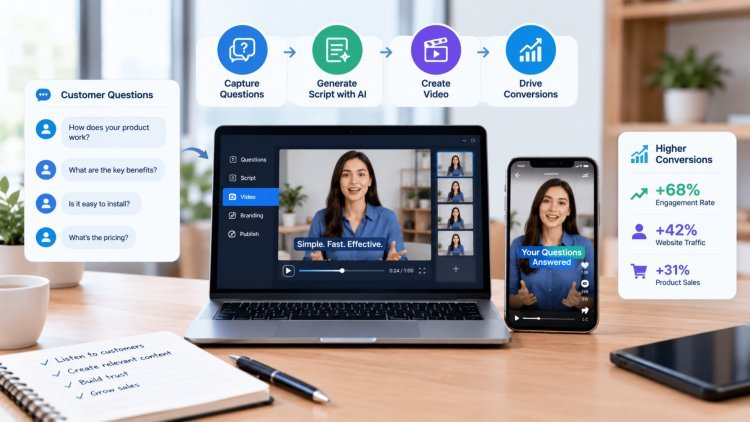
Customer Question → Video Answer → Audience Trust → Business Growth
SHORT-FORM VIDEO FRAMEWORK

Structuring the Perfect
60-Second Answer Video

Knowing what to say is only half the battle. The structure of your answer video determines whether a viewer stays engaged, gets their question resolved, and takes the next step — or bounces within the first three seconds. The following four-part framework has been refined across thousands of short-form videos to maximise both retention and conversion.

THE 4-PART FRAMEWORK
From Question to Conversion
60 SECONDS
01 · Hook
02 · Payload
03 · Detail
04 · Path
01
HOOK

The Hook — Speak Their Exact Words

FIRST 3 SECONDS

Open by restating the viewer's question using their precise language, not your internal jargon. If someone searches "why is my invoice not generating," your video should begin with exactly that phrase. This immediately confirms to the viewer that they have found the right answer, reducing the bounce rate dramatically. The first three seconds are a trust signal, not a branding opportunity — save your logo for the end screen.

OPEN WITH THE EXACT QUERY

"Why is my invoice not generating?"

02
PAYLOAD

The Payload — Answer First, Context Second

FIRST 10 SECONDS

Deliver the core answer within the first 10 seconds. No lengthy welcomes, no "smash that subscribe button," no company history. The viewer has a specific, urgent question — reward their attention immediately. This approach, often called the "inverted pyramid" model borrowed from journalism, builds enormous goodwill and positions your brand as one that respects the viewer's time. Additional context can follow, but the answer must come first.

DO
Deliver the core answer immediately.
AVOID
Long welcomes, subscription requests, and company history.
03
DETAIL

The Detail — Prevent the Follow-Up

CRITICAL CAVEAT

After the direct answer, include the single most important caveat, exception, or piece of supporting logic that prevents a follow-up support ticket. For example, if the answer is "yes, you can export this as a PDF," the detail might be "but only if your account is on the Pro plan or above." This one extra sentence saves your support team hours of repetitive correspondence and demonstrates genuine expertise rather than surface-level knowledge.

EXAMPLE: ANSWER + CAVEAT

"Yes, you can export this as a PDF."

"But only if your account is on the Pro plan or above."

04
PATH

The Path — Always Close with a CTA

FINAL STEP

Every video must end with a clear, purposeful call-to-action. Direct viewers to a relevant help article, a product page, or a free consultation — ideally back to Digiverse.studio where they can explore deeper resources, see your full service offering, and take the next step in their journey. A video without a CTA is a missed conversion opportunity. Even a simple "Read the full guide at Digiverse.studio" measurably improves downstream engagement and traffic.

SAMPLE CALL-TO-ACTION

"Read the full guide at Digiverse.studio." Explore Digiverse Studio ↗

”
THE PRINCIPLE BEHIND EVERY FRAME

"The goal is not to make a video. The goal is to make a decision easier. Structure every frame with that purpose in mind."

The Batch Production Advantage: Work Smarter, Publish More

The biggest reason most businesses never build a question-answer video library is the perceived time cost of production. Batch recording solves this by collapsing setup, scripting, filming, editing, and scheduling into a repeatable system — turning scattered one-off recordings into a cohesive library. [284][293][295]

How It Works
One session.
A full library.
The Batch Method

Instead of recording one video per week across scattered sessions, block a 2–3 hour recording window and produce 10–15 complete answer videos in one sitting. Keep the same outfit, background, energy, and four-part script structure. The result is a cohesive, branded library that appears to have taken months — produced in a single afternoon. [284][293][295]

The Batch Production Workflow
Prepare
Write all scripts in advance and order topics for natural transitions.
Record
Use a teleprompter to reduce forgotten lines and maintain confident delivery.
Edit in Bulk
Apply one visual template across every clip for speed and consistency.
Schedule
Drip 15 videos across 6–8 weeks to maintain publishing cadence.

Batch workflows commonly separate planning, recording, editing, and scheduling into distinct blocks. Grouping videos by setup, outfit, lighting, and topic makes filming faster and makes bulk editing far more efficient.

Branding
Consistency builds recognition
Whether you use a human presenter, AI avatar, or screen capture, maintain the same colors, fonts, lower-thirds, and intro/outro. Repeated visual coherence helps viewers associate the brand with expertise and reliability.
SEO Integration
Pair video with written answers
Embed each video at the top of relevant documentation or help articles, add a concise written summary, and use VideoObject schema where appropriate. Lazy-load embeds to protect page speed, and track engagement time rather than assuming dwell time directly causes rankings. [294][297]
10x
Potential speed advantage of batch sessions versus ad-hoc recording; validate against your own production time.
1.4x
Wistia-reported average time on page for pages with video versus pages without video. 
30%
Atlassian-reported average ticket-deflection rate from short help videos; 80% should be treated as an aspirational upper bound, not a default. 
The Bottom Line
Batch production turns content creation from a recurring interruption into a repeatable operating system.
Prepare once, record in one focused block, edit with a shared template, publish on a schedule, and embed every answer where customers already need it.

Measurement, Maintenance, and Long-Term Growth

Publishing your video library is the beginning, not the end. A question-answer video strategy only compounds in value if it is actively measured, maintained, and iterated upon. Here is how to treat your video library as a living business asset rather than a static archive.

Performance Framework

What to Measure — and Why Ticket Deflection Beats Views

Vanity metrics like view counts and subscriber numbers feel rewarding but rarely correlate with business outcomes. Instead, build your measurement framework around metrics that reflect real commercial impact:

Ticket Deflection Rate
Are support requests for the topics you have covered decreasing month-over-month? This is the clearest signal that your videos are doing their job.
CTR on In-Video CTAs
What percentage of viewers are clicking through to Digiverse.studio after watching? A low rate indicates a weak or misaligned call-to-action.
Assisted Conversions
Use UTM parameters on your video CTAs to track how many leads or sales were influenced by a video touchpoint in the customer journey.
Search Ranking Improvements
Monitor whether the pages where you embed videos begin to rank higher for the question-based queries they target.
Average Watch Duration
A drop-off within the first 10 seconds signals a hook problem; a drop-off after the answer signals a CTA that is not compelling enough.
Content Operations

Maintenance Schedule — Keeping Your Library Evergreen

Set a recurring calendar reminder every 4–6 months to audit your video library. Products change, pricing evolves, features are added or deprecated — and an outdated answer video can cause more confusion than having no video at all.

During each audit, update scripts where the core answer has changed, retire videos that are no longer relevant, and identify new questions that have emerged from your support queue since the last recording sprint. As your services at Digiverse.studio grow and evolve, your video library should grow alongside them — always reflecting the most current, accurate, and helpful version of your expertise.

Track Deflection
Measure the reduction in repetitive support tickets for covered topics every month.
Audit Every 6 Months
Schedule systematic reviews to update, refresh, or retire content as your product evolves.
Expand the Library
New questions emerge constantly. Run a fresh batch sprint each quarter to stay ahead of your audience's doubts.
Iterate on CTAs
A/B test different calls-to-action and landing pages to continuously improve your downstream conversion rate.
Strategic Reality

Your customers are already asking the questions. The only choice left is whether you will be the one to provide the definitive, trust-building, conversion-driving answer — or leave that space open for a competitor to fill.

Start This Week

Start with your top 10 most-asked questions. Record them in a single afternoon. Publish them this week. That one batch session could deflect hundreds of support tickets, rank for dozens of long-tail searches, and silently close sales for the next 12 months — all while you focus on building what's next.

Questions → Answers → Trust → Conversions → Long-Term Growth

What's Your Reaction?

like

dislike

love

funny

angry

sad

wow