How to Repurpose Webinar Recordings Into a Multi- Channel Content Library
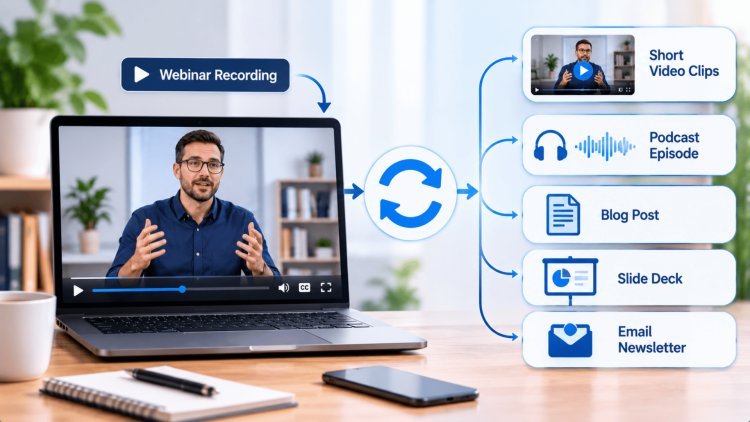
A single webinar recording holds far more value than one live session. When treated strategically, a 60-minute recording becomes the engine powering weeks of blogs, clips, carousels, emails, and SEO content — all without recording a single new word. This presentation walks you through a four-phase framework to unlock that potential and build a truly scalable content ecosystem.
Phase 1: The Core Asset Foundation
Before a single clip is cut or a single paragraph is written, the most important step is establishing your webinar recording as the central content hub — the single source of truth from which all derivative assets originate. A well-structured foundation determines the quality, consistency, and reach of everything that follows.
The Content Repurposing System
↓
Blog
LinkedIn
Email
Shorts
SEO Content
01
Your Recording Is the "Source of Truth"
A single 60-minute webinar session carries enough raw intellectual capital to fuel an entire month of multi-channel content. Think of it not as a video file, but as a modular content library in its most compressed form.
The strategic goal is simple: extract, reformat, and redistribute every insight across the channels your audience already inhabits — from LinkedIn feeds to Google search results to email inboxes.
The content workflow begins before the editing timeline is touched. Using AI-powered transcription tools — such as Otter.ai, Descript, or Riverside — you can instantly generate a full transcript enriched with timestamps, speaker labels, and keyword flags.
This transcript becomes your working document for everything: blog drafts, quote graphics, email subject lines, and social captions.
Flag high-value moments including actionable tips, counterintuitive data points, and standout Q&A exchanges from the live audience.
03
Structure for Maximum Downstream Reach
Not all content is created equal. During the transcription review phase, deliberately categorize each segment by content type and intended channel.
A tactical tip becomes a short-form video. A stat becomes a carousel slide. A nuanced expert opinion becomes a blog section header. This categorical thinking — practiced by top-tier content teams — is outlined in detail through Digiverse Studio's Content Strategy Services, where foundational asset structuring is designed to compound reach over time rather than deliver one-time spikes.
Transcript Repurposing Map
Content Element
Tactical Tip
Key Statistic
Audience Question
Expert Insight
Webinar Segment
Repurposed Asset
Short Video Clip
Carousel Graphic
Social Post / FAQ
Blog Section
Long-Form Article
Pro Tip
Map your transcript segments to content types before touching your editing software.
This pre-production clarity cuts your production time by up to 40% and ensures no high-value insight is left on the cutting room floor.
Foundation Principle
The quality of your content engine is determined long before editing begins. A structured transcript, clear content taxonomy, and centralized source asset create the foundation for scalable content distribution.
Webinar → Transcript → Content Map → Content Engine
Phase 2 · Content Repurposing
The "Core Chop" — Micro-Content Strategy
Once your foundational transcript is complete and your best moments are flagged, the next phase is what content professionals call the "Core Chop" — the art and science of extracting your highest-value segments and reformatting them as short-form, platform-native micro-content. This is where your single recording begins multiplying into dozens of discrete, high-performing assets.
01
Extract 5–7 High-Value Segments
Resist the temptation to pull every interesting moment. Instead, apply editorial discipline by selecting only the 5 to 7 segments that deliver the clearest standalone value. Prioritize moments that contain actionable tips a viewer can apply immediately, counterintuitive statistics that challenge assumptions, or bold expert opinions that spark conversation. Each of these segment types performs differently on social media — tips drive saves, stats drive shares, and opinions drive comments — giving you a built-in distribution strategy for each clip.
02
Format for Sound-Off Mobile Consumption
Modern social media audiences consume the vast majority of video content without sound — studies consistently show that 85% of Facebook video and over 60% of LinkedIn video is watched on mute. Your clips must communicate their full value visually. Edit each segment to 30–90 seconds in a 9:16 vertical format, burn in high-contrast captions using tools like Captions.ai or Submagic, and open each clip with a bold hook text overlay within the first two seconds. Add a lowerthird name tag and a subtle branded color bar to reinforce visual identity across every asset.
03
Build Authority by Addressing Pain Points
Each micro-clip should be mapped to a specific audience pain point or frequently asked question. This transforms generic video content into precision-targeted authority content. To identify which pain points resonate most deeply with your target audience, Digiverse Studio's Data Analytics Consulting provides behavioral insights and audience intelligence that allow you to align every clip with what your prospects are actively searching for and struggling with.
Micro-Content Workflow
From One Recording to Multiple Assets
✂
Extract
Select 5–7 standalone gold moments from the full recording based on actionability and shareability.
▣
Reformat
Convert to 9:16 vertical with burned-in captions, hook overlays, and branded lower-thirds.
◎
Target
Map each clip to a specific audience pain point or FAQ for precision distribution.
↗
Distribute
Publish across LinkedIn, Instagram Reels, YouTube Shorts, and TikTok based on audience fit.
Phase 3: Remastering for SEO and Engagement
With your micro-content library live and distributing, Phase 3 shifts from short-form virality to long-term organic visibility. Transform the webinar’s intellectual depth into SEO-optimized written and visual assets that attract, educate, and convert audiences who discover you through search and professional networks — often weeks or months after the live event. [556][559][570]
Asset 01
The Pillar Blog Post
Turn the webinar transcript into a comprehensive, scannable pillar page. Organize key topics into clear H2 and H3 sections, embed the best micro-clips, include the full recording, and target a primary keyword cluster of 2–4 related search terms. [556][559][570]
Asset 02
The LinkedIn Carousel Effect
Convert the webinar slide deck into a standalone LinkedIn document carousel. Remove presenter-only slides, add data visualizations, rewrite slide copy for readers, open with a bold hook, and close with a CTA to the pillar page. [560][561][565]
Asset 03
Building the Traffic Engine
Connect every asset: the pillar page embeds clips and links to the carousel; clips link back to the blog; email features a carousel preview with a “read the full post” CTA. The interlinking architecture turns isolated publications into a compounding growth loop. [556][559][570]
The Pillar Page
Written for humans.
Structured for search.
How to Build It
A true pillar page goes beyond a webinar summary. Organize the key topics into clearly defined sections, use descriptive H2 and H3 subheadings, embed the strongest micro-clips, and include the full recording for visitors who want the complete experience. [556][559][570]
The LinkedIn Carousel Effect
3x
Reported organic-reach multiplier for LinkedIn document carousels versus standard posts. [561][563][564]
+39%
Document posts generated 39% more reach than the average LinkedIn post in a 3-million-post study. [565][568]
+30%
Document posts generated 30% more engagement than the average LinkedIn post in the same study. [560][565][568]
The Interlinking Architecture
Pillar Page
+ Embedded Clips
LinkedIn
Carousel
Email
Preview
Clip Comments
Back to Blog
Use contextual internal links in both directions: the pillar introduces each supporting asset, while each derivative links back with relevant anchor text. This creates a clear semantic map for users and crawlers. [556][559][570]
Video SEO Essentials
Embed videos using standard HTML elements, place them near relevant text, and provide descriptive titles and descriptions. Add VideoObject structured data, ensure metadata matches the actual video, and create a dedicated page for high-priority videos. [556][557][559]
Relevant
Page Text
Descriptive
Metadata
VideoObject
Schema
Video
Sitemap
The Bottom Line
A webinar recording without a repurposing strategy is like owning a gold mine and only spending what fell from your pocket.
The transcript, slides, and Q&A are every seam waiting to be worked — into a pillar page, carousel, clips, email, and a compounding traffic engine.
Phase 4
Scaling Your Content Ecosystem
The final phase is where individual tactics transform into a self-sustaining content engine. This is the operational layer that ensures your webinar repurposing effort doesn't collapse after the first week of publication enthusiasm — but instead builds consistent momentum, audience touchpoints, and measurable brand authority across every channel simultaneously.
1
Week 1
Core Distribution
Publish the Pillar Page
Release 2 micro-clips on LinkedIn and Instagram
Send a dedicated email to your list featuring the full recording embed
2
Week 2
Carousel & Engagement
Release the LinkedIn document carousel
Share a stat graphic on Twitter/X
Publish a Q&A-derived FAQ post on your website or blog
3
Week 3
Amplification
Drop the remaining micro-clips
Send a follow-up email with "what you might have missed" framing
Promote your Pillar Page via paid amplification
Measure for Real Impact — Not Vanity
The most common mistake in multi-channel repurposing is measuring individual post performance in isolation.
A LinkedIn clip that receives modest engagement may have directly influenced three email opens that converted into a discovery call.
Instead, measure total ecosystem reach:
1 The cumulative unique impressions across all repurposed assets
2 Lead form completions traceable to the content cluster
3 Pipeline influence attributed to the webinar topic
The 90-day measurement window
Week 1 Weeks 6–12: strongest SEO traffic Week 12
Establish a 90-day measurement window — content compounds over time, and your SEO-driven Pillar Page will often deliver its strongest traffic in weeks 6 through 12, not week one.
Your Webinar Is a Renewable Resource
Perhaps the most powerful mindset shift in this entire framework is recognizing that a webinar recording is not a one-time event asset — it is a renewable content resource with an extraordinarily long shelf life.
Expert insights don't expire.
Tactical frameworks don't become irrelevant overnight.
Six months after publishing:
Pillar Page
Can be updated with fresh stats.
Micro-clips
Can be reposted with new captions targeting different audiences.
Carousel
Can be refreshed with a new cover slide and redistributed to your growing LinkedIn following.
10x
Content Output
A single 60-min recording can generate 10+ distinct content assets across channels.
3x
Engagement Lift
LinkedIn carousels generate 3x the reach of standard image posts on average.
90
Day Window
Measure content performance over 90 days — SEO traffic peaks in weeks 6–12.
85%
Silent Viewers
85% of social video is watched on mute — burned-in captions are non-negotiable.
The Mindset Shift
When you internalize this philosophy — treating every recording as a modular, living library rather than a finished product — you stop creating content reactively and start building an enduring brand asset that grows in authority, reach, and value with every passing quarter.
Explore how Digiverse Studio's full suite of services can help you architect and scale this system from your very next webinar.